User docs / Configuration / Preferences User documentation
Preferences# Preferences can be changed in the settings window or in preferences.json in the application data directory. The tables below describe the packaged defaults for a new profile. Existing profiles keep their own values, and values accepted by the application are defined in packages/desktop/src/main/preferences/schema.json.
The shipped default file is packages/desktop/static/preference.json preferences.json
General#
Key Type Default Description autoSave Boolean true Automatically save the document after a change. autoSaveDelay Number 5000 Delay in milliseconds before an automatic save. Minimum 1000 titleBarStyle String custom Windows titlebar style: custom native openFilesInNewWindow Boolean false Open a file in a new window instead of the current window. openFolderInNewWindow Boolean false Open a folder in a new window instead of the current window. zoom Number 1.0 Application zoom level, from 0.5 2.0 hideScrollbar Boolean false Hide editor scrollbars. wordWrapInToc Boolean false Wrap long heading labels in the Outline panel. fileSortBy String created Sort files in an opened folder by created modified title fileSortOrder String asc Sort files in ascending (asc desc startUpAction String restoreAll Startup behavior: folder openLastFolder blank restoreAll defaultDirectoryToOpen String "" Folder to open when startUpAction folder language String zh-CN Display language. restoreLayoutState Boolean true Restore open tabs and layout on startup. openedFilesInSidebar Boolean true Show the Opened Files subsection in the Files panel. shortcutStyle String typora Shortcut preset: typora marktext Key bindings . treePathExcludePatterns Array of Strings [] Glob patterns excluded from the Files tree.
Editor#
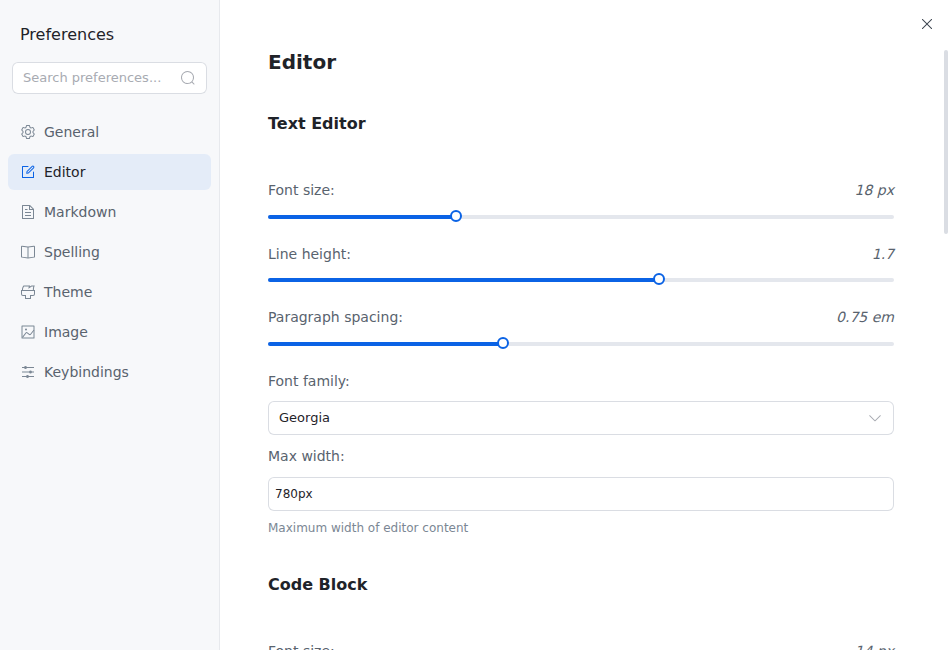
Key Type Default Description editorFontFamily String Georgia Writing-surface font family. fontSize Number 18 Editor font size in pixels, from 12 32 lineHeight Number 1.7 Editor line height, from 1.2 2.0 paragraphSpacing Number 0.75 Spacing between paragraphs. wrapCodeBlocks Boolean false Wrap long lines inside code blocks. editorLineWidth String 780px Maximum writing-surface width. Accepts an empty value or a ch px % codeFontSize Number 14 Font size inside code blocks, from 12 28 codeFontFamily String DejaVu Sans Mono Code-block font family. codeBlockLineNumbers Boolean false Show line numbers inside code blocks. trimUnnecessaryCodeBlockEmptyLines Boolean true Trim empty lines at the beginning and end of code blocks. autoPairBracket Boolean true Auto-close brackets while editing. autoPairMarkdownSyntax Boolean true Auto-close Markdown delimiters while editing. autoPairQuote Boolean true Auto-close quotation marks while editing. endOfLine String default Newline style: default lf crlf defaultEncoding String utf8 Default file encoding. autoGuessEncoding Boolean true Guess a file's encoding when opening it. autoNormalizeLineEndings Boolean false Normalize line endings when opening a file. trimTrailingNewline Number 2 Trailing-newline behavior: 0 1 2 3 textDirection String ltr Writing direction: ltr rtl hideQuickInsertHint Boolean false Hide the empty-paragraph hint for the / hideLinkPopup Boolean false Hide the link popup shown when hovering over a link. autoCheck Boolean false Automatically check related task items when one is toggled.
The Editor page exposes the writing-surface controls described above:
Markdown#
Key Type Default Description preferLooseListItem Boolean true Prefer loose list items when serializing lists. bulletListMarker String - Bullet marker: - * + orderListDelimiter String . Ordered-list delimiter: . ) preferHeadingStyle String atx Heading style: atx setext tabSize Number 4 Number of spaces represented by a tab. listIndentation Mixed 1 List indentation: dfm tab 1 4 frontmatterType String - Front matter delimiter: - + ; { superSubScript Boolean false Enable pandoc-style superscript and subscript syntax. footnote Boolean false Enable footnote syntax. isHtmlEnabled Boolean true Render inline HTML. isGitlabCompatibilityEnabled Boolean false Enable GitLab compatibility mode. sequenceTheme String hand Sequence-diagram style: hand simple plantumlServer String https://www.plantuml.com/plantuml PlantUML server used to render PlantUML diagrams.
Appearance#
Key Type Default Description theme String light Current appearance: light dark paper Appearances . followSystemTheme Boolean false Switch between the configured light and dark appearances with the operating system. lightModeTheme String light Appearance used for system light mode when followSystemTheme darkModeTheme String dark Appearance used for system dark mode when followSystemTheme
Spelling#
Key Type Default Description spellcheckerEnabled Boolean false Enable spell checking. spellcheckerNoUnderline Boolean false Keep spell checking enabled without underlining misspelled words. spellcheckerLanguage String en-US Default spell-checking language, using a BCP-47 language tag.
Image#
Key Type Default Description imageInsertAction String path Default local-image action: upload folder path imagePreferRelativeDirectory Boolean false Prefer copying images into a relative directory. imageRelativeDirectoryBase String file Anchor relative images to the document (file folder imageRelativeDirectoryName String assets Folder name or path for copied images. Supports the ${filename}
Editable via file#
The following entries are marked --internal preferences.json
View#
Key Type Default Description sideBarVisibility Boolean true Initial sidebar visibility. tabBarVisibility Boolean true Initial tab-bar visibility. sourceCodeModeEnabled Boolean false Initial source-code mode.
General (internal)#
Key Type Default Description lastOpenedFolder String "" Last folder opened, used when restoring the previous session.
Custom CSS#
Key Type Default Description customCss String "" CSS appended after the active application appearance stylesheet.
File system / Searcher#
Key Type Default Description searchExclusions Array of Strings [] Filename glob patterns excluded from in-folder search. searchMaxFileSize String "" Maximum search size, such as 50K 10M 2G searchIncludeHidden Boolean false Include hidden files and directories. searchNoIgnore Boolean false Ignore ignore-files such as .gitignore searchFollowSymlinks Boolean true Follow symbolic links while searching.
Watcher#
Key Type Default Description watcherUsePolling Boolean false Use polling for file changes; useful for network shares but more CPU-intensive.