
Interface#
Main interface#
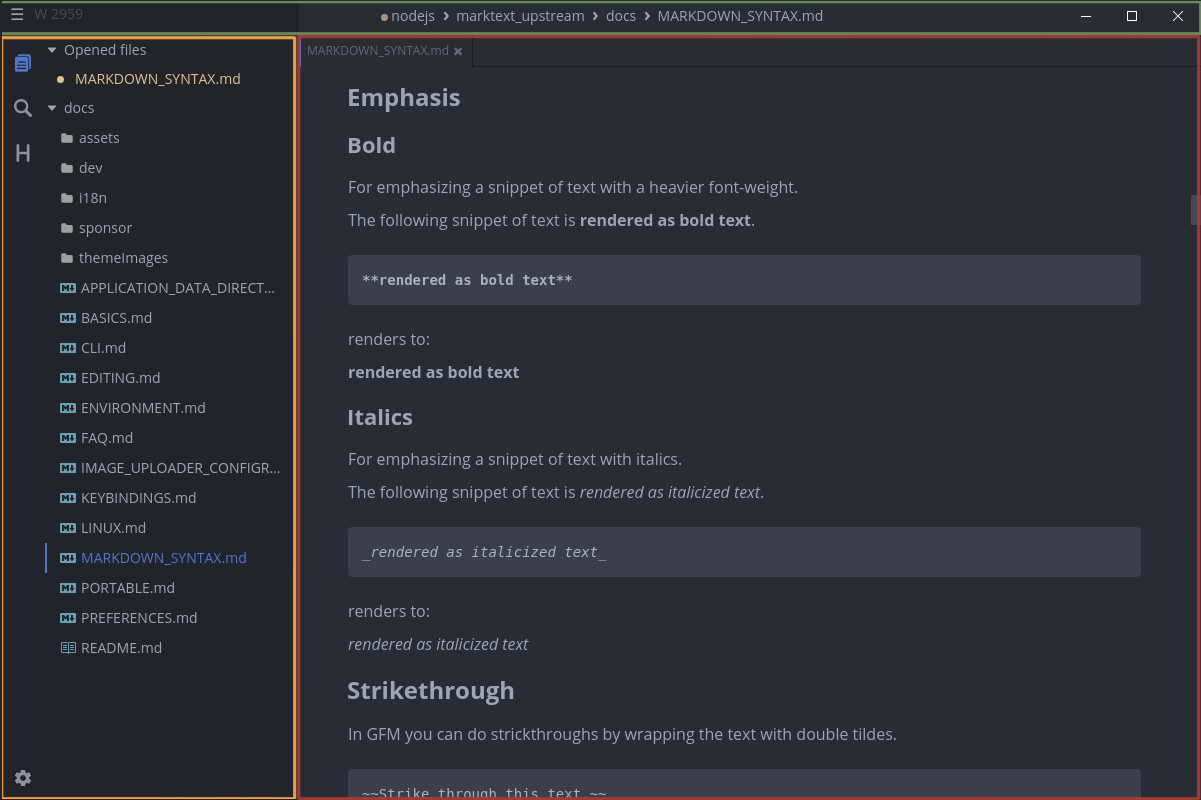
The desktop shell is split into three main regions:
- Titlebar: window controls, the current document, menus, save state, word count, and the command launcher.
- Sidebar: Files, Search, Outline, and the More menu for Document Info. The settings entry remains at the bottom.
- Editor: document tabs, the formatted preview or source editor, and the per-tab status area.
Titlebar#
The titlebar is rendered by Inkiva on Windows and Linux by default, while macOS uses client-side decorations. The titleBarStyle preference can select the native Windows titlebar. The command launcher is a clickable titlebar control and can also be opened with its menu shortcut.
Sidebar#
The sidebar is optional and keeps navigation close to the document. The Files panel shows the opened root directory and Opened Files; Search uses the opened folder as its scope; Outline reflects headings in the selected tab; and Document Info exposes backlinks and Local History.
Editor#
The preview editor is powered by Muya and the source-code editor by CodeMirror. Both operate on the same Markdown document model and file path. The renderer also hosts contextual tools such as the quick-insert menu, paragraph actions, inline formatting, link/image tools, emoji picker, table controls, and diagram editors.